

Phone
01204 89 6440General Enquiries
hello@statuo.co.ukClient Enquiries
accounts@statuo.co.ukHello I’m Adam // General Manager
Drive quality traffic to your site
Talk to me todayHello I’m Faye // Marketing Director
Drive quality traffic to your site
Talk to me todayGoogle is helping creators improve their visibility in Search with the launch of new customisable Search Profiles.
The feature gives creators and publishers a dedicated space to showcase their content across platforms, making it easier for audiences to discover and follow their work across the web.
Katie White
Jun 12, 2026
Google Search Profiles are dedicated profile pages that allow creators and publishers to showcase their content directly within Google Search.
A Search Profile can include an avatar, bio, website, social media accounts and content from linked platforms. Users can also follow creators from their profile, making it easier to discover future content through Google Discover.
Profiles can be accessed through a creator's Google Knowledge Panel, from content surfaced in Discover, or via a direct URL. For eligible creators, claiming a Search Profile may also lead to the creation or enhancement of a Google Knowledge Panel.
Creators with a sizeable following on at least one major social platform can claim and customise a Search Profile with an avatar, bio and links to their website, social media accounts and video platforms.
For eligible creators and publishers, claiming a profile may also trigger the creation of a Google Knowledge Panel. Existing Knowledge Panels can be enhanced with updated profile information, content and links.
Google requires creators to meet at least one of the following minimum audience thresholds:
YouTube: 100,000 subscribers
Instagram: 100,000 followers
X: 100,000 followers
TikTok: 300,000 followers
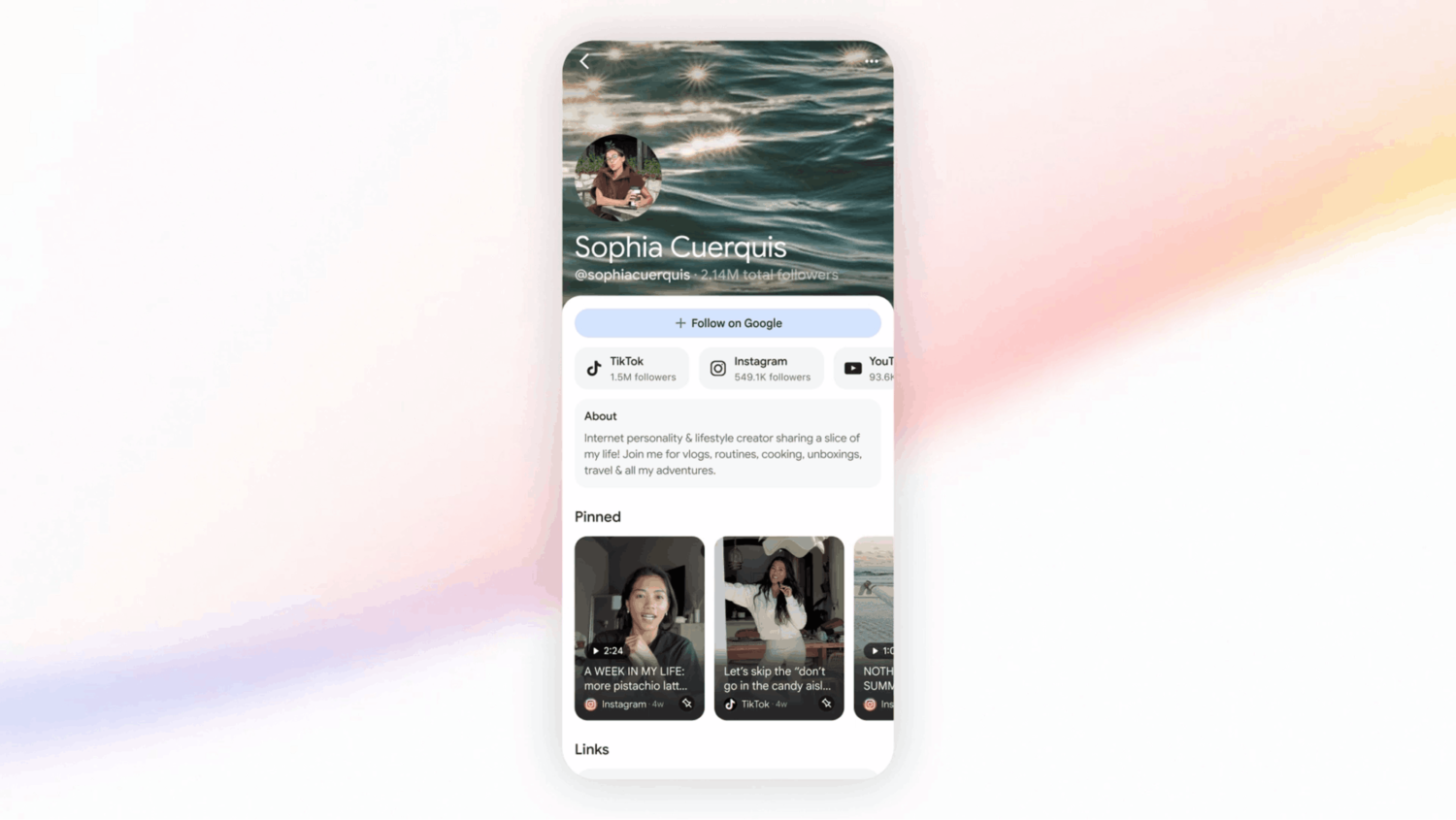
“Search profiles give publishers and creators a central place to showcase their latest articles, videos and social posts. People can easily follow sources from their profile, so they’re more likely to see that content on Discover, found on the home screen of the Google app.
Search profiles can be accessed on mobile via a creator or publisher’s knowledge panel (the information box on Search for notable people, places and things), by tapping the name of a publisher or creator on Discover, or through a direct URL.”
For fans, Search Profiles create a central hub where they can quickly access a creator's content, social channels and website from a single place.
Rather than searching across multiple platforms, users can discover and follow creators directly through Google Search and Discover.
This move feels like part of a much larger strategy from Google.
For years, Google was the default destination when people wanted answers. But, younger audiences are increasingly turning to social platforms instead.
A 2024 SOCi study found that 67% of Gen Z users searched on Instagram, 62% used TikTok and 61% used Google. Even back in 2022, Google disclosed that 40% of young people use TikTok or Instagram to search for a place for lunch rather than Google or Google Maps.
While Google's dominance isn't under immediate threat, the way people search is clearly changing. Users no longer just search for information, they search for people.
If someone wants restaurant recommendations, fashion inspiration, travel advice or product reviews, they may prefer content from creators they already trust rather than anonymous websites. Creator-led content often feels more authentic and relatable than traditional search results.
Search Profiles appear to be Google's response to this shift.
Instead of users jumping between Google, TikTok, Instagram, YouTube and a creator's website, Search Profiles bring a creator's online presence together in one place. Their latest videos, articles, social posts and website links can all be viewed within Google's ecosystem.
It's a notable evolution for Search. Historically, Google organised information around websites. Search profiles suggest Google is increasingly organising information around people.
This comes after Google recently expanded its indexing of social media content from platforms like TikTok and Instagram, while continuing to increase the visibility of creator content within Discover.
Search Profiles feel like the next logical step, creating a central identity layer that connects all of that content together.
Whether Google's goal is to compete with social platforms or simply adapt to changing user behaviour, one thing is clear: creators are becoming a more important part of the Search experience.
I don’t necessarily think Google is trying to become a social network. Instead, it's recognising that creators have become an important part of how people search, discover and evaluate information online.
If users are already turning to creators for answers, Google wants to make sure those discovery journeys still start, and stay, within Search.
Before you can claim a Search Profile, you'll need to:
Google may have already generated a Search Profile based on your existing online presence.
To check:
If you operate multiple brands, channels or creator identities, Google may generate separate profiles for each one.
If you don't already have a profile:
Google will usually assign a handle based on your largest linked platform.
Once your profile is live, you can:
For eligible creators, claiming a Search Profile may also create or enhance a Google Knowledge Panel.
At launch, Search Profiles are only available in the US, although Google has said it plans to expand availability in the future.
Google may have already created a Search Profile based on your online presence.
To check:
Users can access your Search Profile in several ways:
Google may also display information from your profile, such as your bio and social links, directly within Search results.
Yes. You can update your profile information at any time.
However, changes to key details such as your name, bio and social links must be reviewed and approved by Google before they go live. While under review, updates will show as Pending.
Content is pulled automatically from the social accounts connected to your Search Profile.
Once you link a new platform, Google will begin displaying content from that account. Updates typically appear within 24 hours.
No. Creating a Search Profile does not directly affect your rankings in Google Search.
However, users who choose to follow you may see more of your content in Google Discover.
Search Profiles are designed to appear when users search specifically for you.
If you have a common name, Google may struggle to identify which person a user is looking for. In these cases, searching for your social media handle (such as @username) may help surface your profile.
If your profile still isn't appearing, you can submit feedback to Google for review.
If you manage multiple channels, Google recommends using the channel with the largest audience when creating your profile.
You can link additional YouTube channels after your profile has been created.
No. Each creator, brand or identity requires its own Search Profile.
For example, if you have a personal brand, podcast and business brand, you'll need a separate profile for each one.
Yes. A parent, guardian or manager aged 18 or over can create and manage a Search Profile on behalf of someone under 18.

